Shipping rules
A rule is the decision unit of the app: it says under which conditions which methods are offered at which price.
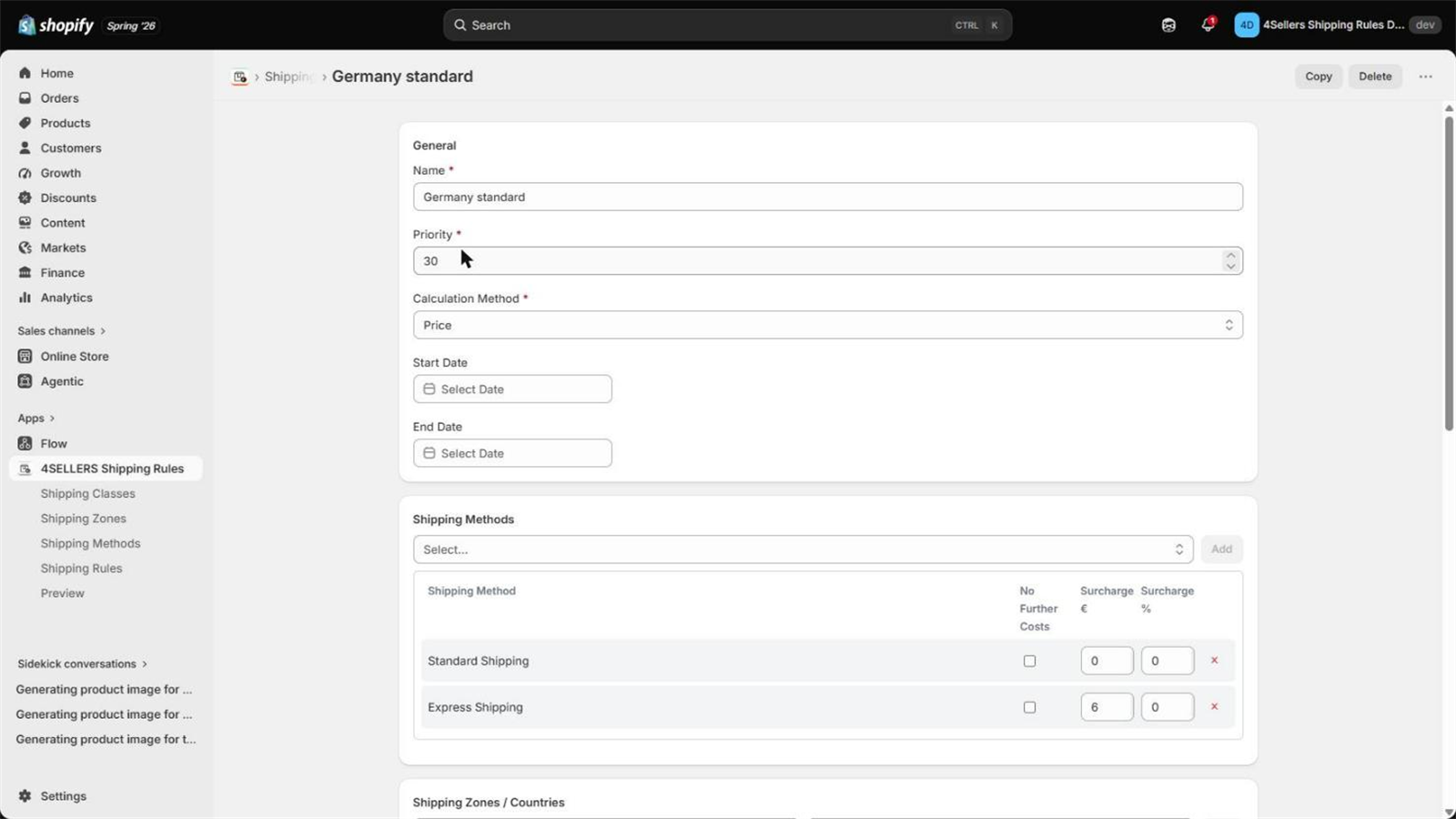
Fields of a rule
| Field | Description |
|---|---|
| Name | A label, for example Germany standard. |
| Priority | Lower number wins. If several rules match, the one with the lowest priority number is used. |
| Calculation method | Determines the base value used for rate tiers: price, quantity, weight, volume or length. |
| Unit | For Weight: the unit the base value is converted into (g, kg, lb, oz, …). |
| Line item property / metafield | Source for volume, length and custom weight values. Format namespace.key. |
| Start / end date | (Optional) Outside this window the rule is skipped. Leave both empty for a rule that always applies. |
Calculation methods
| Method | Base value |
|---|---|
| Price | Sum of item price × quantity across the cart |
| Quantity | Total number of items in the cart |
| Weight | Total cart weight, converted into the rule's unit |
| Volume | Sum of the property value × quantity across the cart |
| Length | The largest single value found in the cart — not a sum |
Where weight comes from
For each cart line, in this order:
- the line item property named in the rule, if the line has it,
- otherwise the product metafield named in the rule,
- otherwise the weight of the variant as Shopify sends it.
Values from a line item property or metafield are read as grams and then converted into the
rule's unit. A metafield holding 2.5 for a 2.5 kg product yields 2.5 g, not 2.5 kg — write
2500. The variant weight from Shopify is handled correctly on its own.
Volume and length
Both need the line item property / metafield field to be filled in — without it the base value stays 0 and no rate tier matches. The value is taken as-is, in whatever unit you maintain it in; the app does not convert volumes or lengths. Volume is summed across the cart and multiplied by quantity, length is the maximum — which is what you want for "does it still fit on a pallet".
Rate tiers
Rate tiers turn the base value into a price.
Example, calculation method Price:
From      To          Price
(empty)   49.99       4.99
50        99.99       2.99
100       (empty)     0.00     ← free shipping from 100
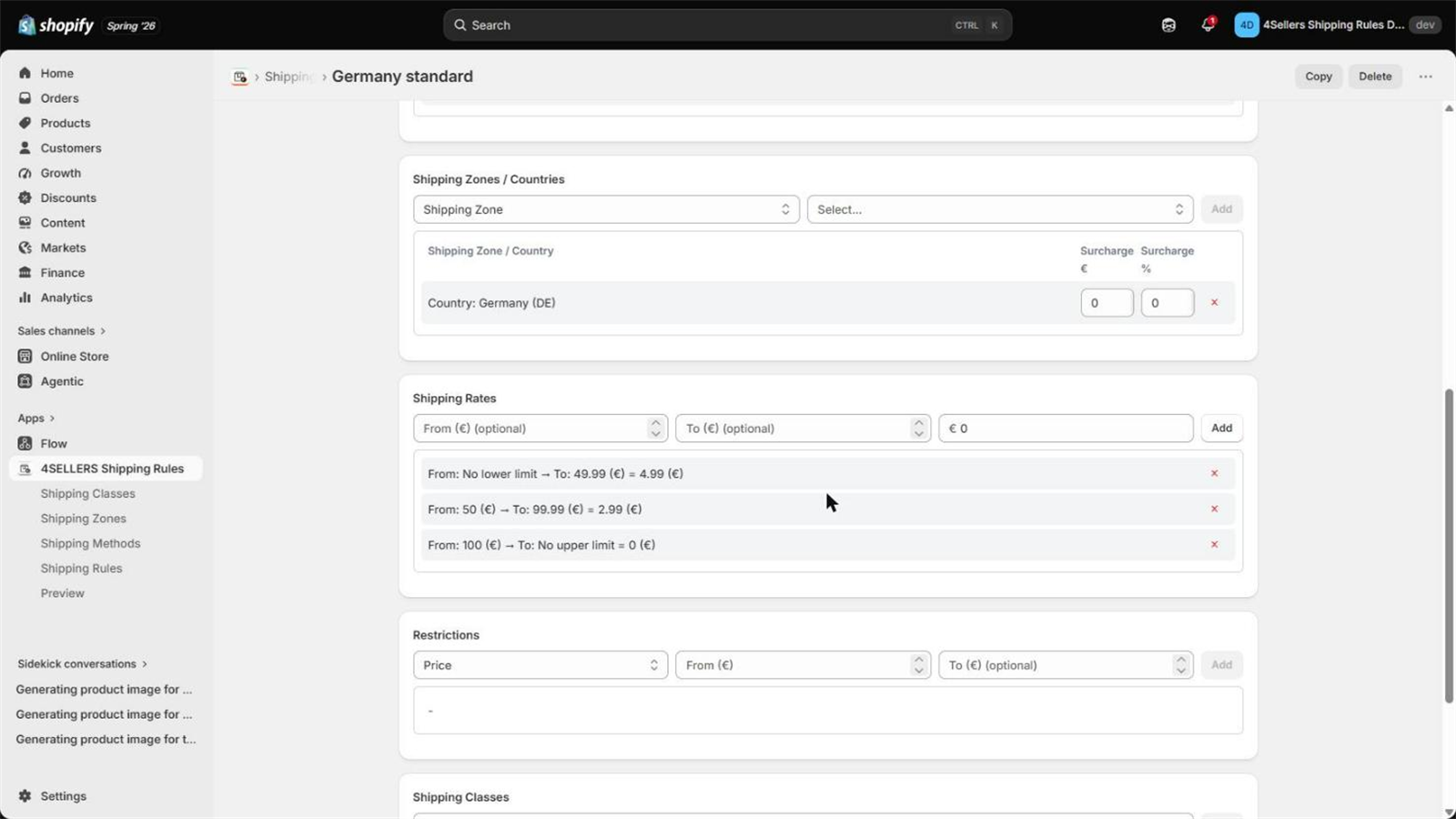
- From and To are inclusive. An empty field means no limit in that direction.
- The first tier that fits provides the price, so keep them in ascending order.
- If no tier fits, the rule does not apply. That is the idiomatic way to enforce a limit: a
single tier up to
5makes a rule that only exists for carts of 5 units or less.
0 behaves like an empty field. For a tier that should only cover an empty base value, use a
small upper bound such as 0.01 instead.
At least one tier is mandatory — as are at least one shipping class and at least one zone or country.
Restrictions (AND / OR)
Restrictions are the optional, fine-grained conditions. They live in groups:
- Within a group: AND — every restriction in the group must pass.
- Across groups: OR — if any one group passes, the rule passes.
Drag and drop moves a restriction between groups, or into the "new group" area to split it out. A rule without any restriction group passes this check automatically.
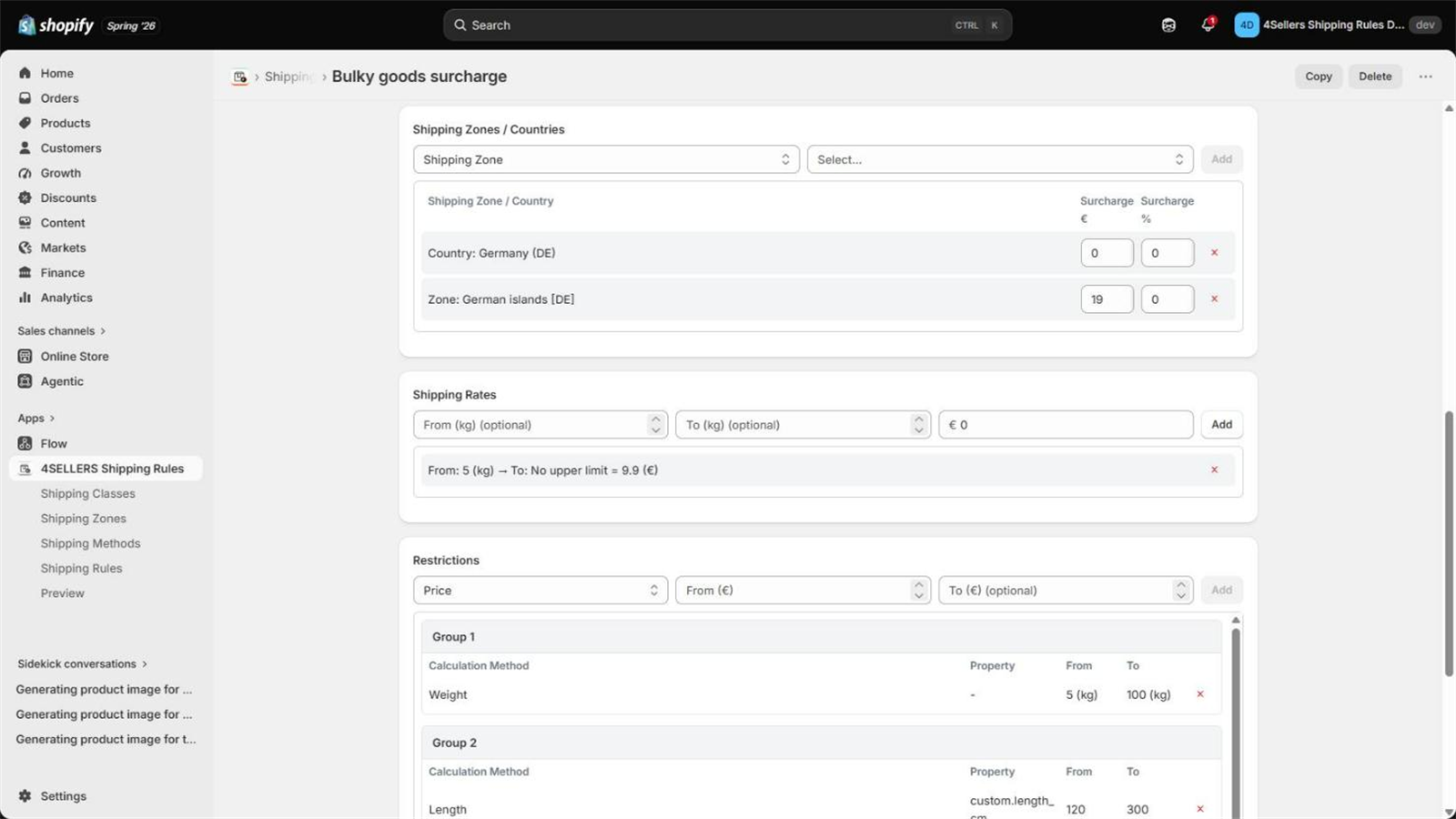
The example above reads: bulky goods are anything from 5 to 100 kg or anything from 120 to 300 cm — two ways into the same rule, which a single condition ladder cannot express.
| Type | Passes when |
|---|---|
| Price | The cart total is within From/To |
| Quantity | The item count is within From/To |
| Weight | The cart weight is within From/To |
| Volume | The cart volume is within From/To |
| Length | The largest length is within From/To |
| Customer tag | The customer carries the selected tag |
Tags are read from the customer Shopify sends with the checkout request. For a guest checkout without a customer record there are no tags, so a tag restriction does not pass. In the preview you can type tags in by hand to simulate the case.
When does a rule apply?
All five checks must pass:
| Check | Passes when |
|---|---|
| Date | Today is inside the start/end window — or no dates are set |
| Shipping classes | Every product in the cart carries one of the rule's classes (mandatory) |
| Zones | The destination matches at least one zone or country of the rule (mandatory) |
| Rate tiers | The base value falls into at least one tier (mandatory) |
| Restrictions | At least one restriction group passes fully — or there are none |
If several rules pass
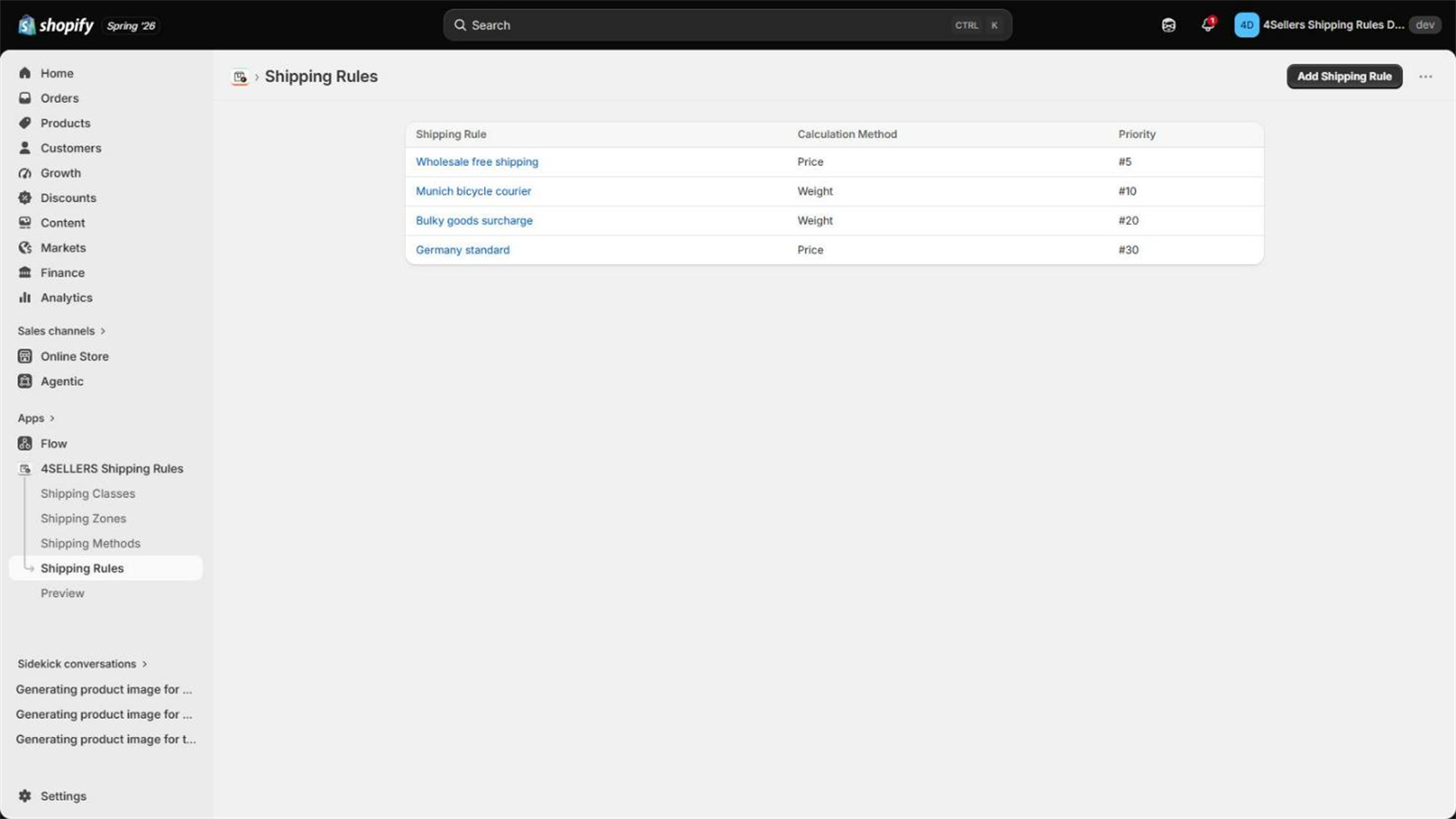
The rule with the lowest priority number wins. Only that rule's methods are offered; the others are not merged in. The preview marks rules that passed but lost on priority.
If no rule passes
The app returns no shipping options. Shopify then shows whatever other shipping options your store has — or none.
How the price is calculated
Base           price of the first matching rate tier
+ Zone         fixed + percentage surcharge of the most specific matching zone
+ Classes      fixed (× quantity) + percentage surcharge per matching cart line
────────────────────────────────────────────────────────────────────────────────
per method     + fixed surcharge + percentage surcharge of that method

With "No further costs" on the method:
per method     = fixed surcharge + percentage surcharge of that method only
Percentage surcharges always refer to the cart total (item price × quantity, summed).
The result is handed to Shopify in the smallest unit of the currency — cents. The currency is the one Shopify sends with the checkout request.
The amount is not converted. A rate configured as 15 is passed on as 15 in whatever currency the checkout runs in. If you sell in several currencies, see the FAQ.
Copying a rule
On the detail page of a rule, zone or method, Copy opens the "create new" form with all values pre-filled. That is the fastest way to build a second rule that differs in one detail — and rules often do.