Troubleshooting
Ordered by how often it happens.
No shipping option at checkout
Alongside "Shipping not available", Shopify often shows "The product in your cart is not available for delivery to your location." That reads like a product or market problem, but Shopify shows it whenever no shipping option at all is available for the destination — including the case where this app simply returned no rate. Check the list below before you go looking at your product, market or location settings.
Work through this list from the top — the first three causes account for most cases.
1. Is your plan delivering rates at all?
- On the Free plan the app never returns rates in a live checkout. Setup and preview work, the checkout does not. See Plans & pricing.
- On Basic the store may hold at most 3 shipping rules. From the fourth rule on, the app returns no rates at all — not just the first three. Delete a rule or move to Advanced.
2. Does any rule actually pass?
Run the same cart through the preview. It names the failing criterion. The three usual suspects:
- the rule has no shipping class, no zone and/or no rate tier — each of those alone makes a rule that can never apply;
- a product in the cart has no matching class — one is enough to fail the whole rule;
- the base value falls outside every rate tier — often a weight in the wrong unit, see below.
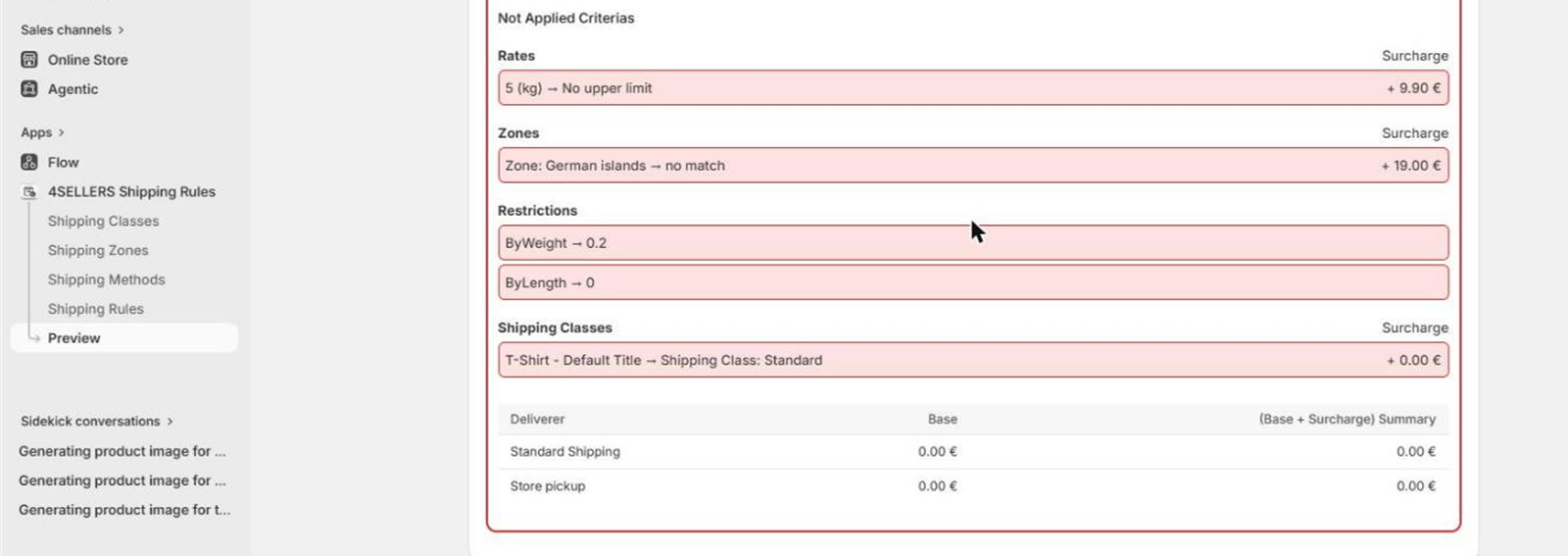
Read the red block Not Applied Criterias: it lists each failed criterion with the value that was
compared. In the example, ByWeight → 0.2 means the cart weighs 0.2 kg while the rule needs at
least 5 kg.
3. Is the method active?
Inactive methods are skipped even inside a passing rule. If the winning rule has only inactive methods, the result is a passing rule with nothing to offer.
4. Can Shopify reach the app?
If the preview is green and the checkout still shows nothing, the connection is the suspect — continue with the next two sections.
The app cannot register its carrier service
Saving a shipping method registers a carrier service in your store. Shopify rejects that registration unless your store is eligible for third-party calculated shipping rates. According to Shopify's own documentation, one of the following must be true:
- the store is on the Advanced plan or higher, or
- the store is on the Shopify plan with yearly billing, or the carrier service feature has been added for a monthly fee (Shopify Support can do this), or
- it is a development store.
Two consequences worth knowing:
- If none applies, saving a method reports the error Shopify returned, and no rates can ever reach your checkout — through this app or any other rate app.
- If a store downgrades its plan later, Shopify deactivates the existing carrier service association. Nothing changes inside the app; the rates simply stop appearing. After an upgrade, save a shipping method again to re-establish it.
No shipping entry in the Shopify shipping settings
The app attaches itself to the delivery profile named exactly General profile and adds one
Shipping Rules Carrier Service (via app) entry to each of that profile's zones. Nothing
happens if:
- the profile was renamed, or
- the profile has no zones — there is nothing to attach to. Add at least one zone (for example your delivery countries) in Settings → Shipping and delivery, then save a shipping method in the app again to trigger the sync.
Check whether Shopify reaches the app at all
There is a built-in shortcut for this. In the checkout, enter rate test as the destination
city (the preview cannot do this — it sends no city). The app then answers with all active
methods at price 0, skipping every rule. So:
- You see all methods at 0 — Shopify reaches the app and the carrier service works. The problem is in your rules.
- You see nothing — Shopify is not reaching the app. Check the carrier service eligibility above.
Weight limits behave unexpectedly
A rule's unit decides what the numbers in tiers and restrictions mean. And values from a line item property or metafield are read as grams before conversion:
| Rule unit | Metafield value | Base value |
|---|---|---|
kg | 2500 | 2.5 |
kg | 2.5 | 0.0025 |
g | 2500 | 2500 |
Weights that Shopify itself keeps on the variant are converted correctly — the trap only exists for your own property and metafield values.
A rule stopped applying after renaming a shipping class
Renaming a class updates neither products nor rules. Both keep the old name and no longer meet. Re-assign the class on the affected products and pick it again in the affected rules. Same after deleting a class.
A threshold or restriction is being ignored
A 0 in a From/To field counts as "not set". Use 0.01 if you really need an upper bound near
zero.
A zone surcharge is not being added
Surcharges are selected by postal code, most specific match first. If Shopify sends no postal code for the destination, no zone surcharge is applied even though the rule matched through a country entry. Put the surcharge on the method instead.
Two rules match and the wrong one wins
The lowest priority number wins, not the highest. Rules that passed but lost are shown collapsed in the preview — that is the quickest way to spot a priority mix-up.
Still stuck?
Contact support — and please include the preview result for the cart in question. It usually answers the first three questions we would otherwise have to ask.